


Tally integration
Step 1: Create an API Key special for Tally integration
In order to create a secure connection between Tally and MessengerOS, you need to create an API key in your MessengerOS account. This key will be used to authenticate the requests made from Tally to MessengerOS.
Step 2: Create a list of emails where your Tally form responders will be stored
• Create an email list: Audience > Lists > Create list
• After the list is created, go to it's dashboard (click on button coresponding to your created list from Lists page)
• Get your Endpoint URL from the Tally integration section
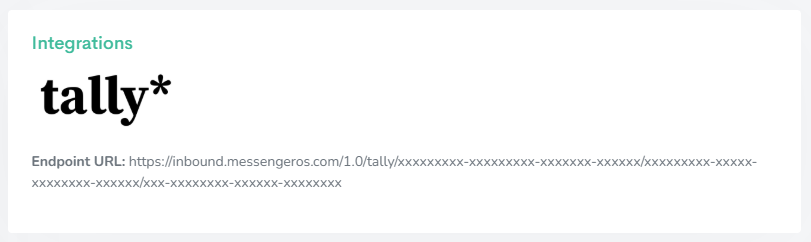
All your Tally responders will be stored in this email list.
Step 3: Add the Endpoint URL to your Tally form
1. Click on your form in Tally
2. Click on the Integrations tab
3. Click on the Connect button from the Webhooks integration
4. Enter the Endpoint URL from your email list from MessengerOS
5. Click on Add HTTP Headers and fill in the following:
5.1. Name: x-api-key
5.2. Value: The API key you created in Step 1
5.3. Click Connect
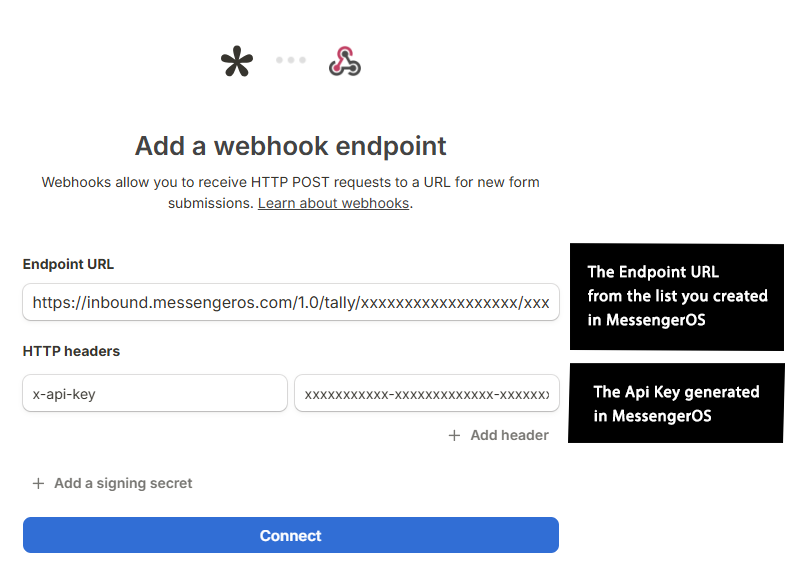
Starting this moment, all your Tally responders will be stored in your email list from MessengerOS.

Tally is a no-code form builder that positions itself as a modern alternative to Typeform, Google Forms, and other traditional form tools. Launched in 2020, it has quickly gained popularity due to its clean design, generous free plan, and powerful customization options. Tally is especially appreciated by creators, startups, marketers, and SaaS businesses for its simplicity and flexibility.
Ease of Use and User Interface
Tally’s standout feature is its extremely intuitive interface. Unlike older form builders that rely heavily on drag-and-drop mechanics or cluttered dashboards, Tally uses a Notion-style editing experience. You just start typing, use slashes ("/") to insert different types of blocks (like text fields, checkboxes, dropdowns, etc.), and build your form as if you were writing a document. This natural workflow makes the learning curve minimal—even for first-time users.
Features and Customization
Despite its simple interface, Tally is surprisingly powerful. You can create multi-page forms, conditional logic flows (show/hide questions based on answers), and perform basic calculations. It supports custom thank-you screens, redirect links, hidden fields (for passing UTM or user data), and more. You can also insert images, videos, or rich text formatting into your forms to match your branding.
One of Tally's biggest appeals is its extensive free plan. Unlike Typeform or Jotform, which place strict limits on responses or advanced features, Tally offers nearly all core features for free, including unlimited forms, responses, and question types. Branding is only minimally present in the free plan (a small “Made with Tally” badge), which many users find acceptable.
Integration and Automation
Tally.so integrates smoothly with most modern tools via webhooks, Zapier, Make (Integromat), and native integrations. For example, you can send form responses directly to your CRM, mailing list, Airtable database, or Slack channel. This makes it an excellent tool for automating marketing or operational workflows. Tally also supports email notifications to both form owners and respondents, with options for basic customization.
If you're running a newsletter or SaaS company, Tally can serve as a lean and beautiful alternative to more bloated form tools. For example, you can create waitlists, beta sign-ups, product feedback forms, or onboarding surveys and feed responses directly into your backend or mailing list provider.
Strengths of Tally.so
- Generous Free Tier: Unlimited forms, questions, and responses—even for free users.
- Beautiful UX: Clean, minimal interface that feels fast and modern.
- No-code Friendly: Ideal for marketers, creators, and teams without technical expertise.
- Customizable: Embed forms on websites, style with custom CSS (Pro), and set up advanced logic.
- Excellent Support: The small but dedicated team behind Tally is known for fast updates and helpful documentation.
Limitations and Considerations
While Tally excels in many areas, it’s not perfect for everyone. It lacks certain advanced enterprise features found in tools like Formstack or Jotform Enterprise—such as HIPAA compliance, complex user roles, or granular access controls. Also, while it supports logic and conditions, it doesn't offer advanced survey analytics, A/B testing, or native analytics dashboards (though you can use integrations like Google Analytics or Plausible).
Additionally, if you require very tight visual control or fully white-labeled forms, you may find Tally’s customization somewhat limited unless you use the Pro plan with custom embeds and CSS.